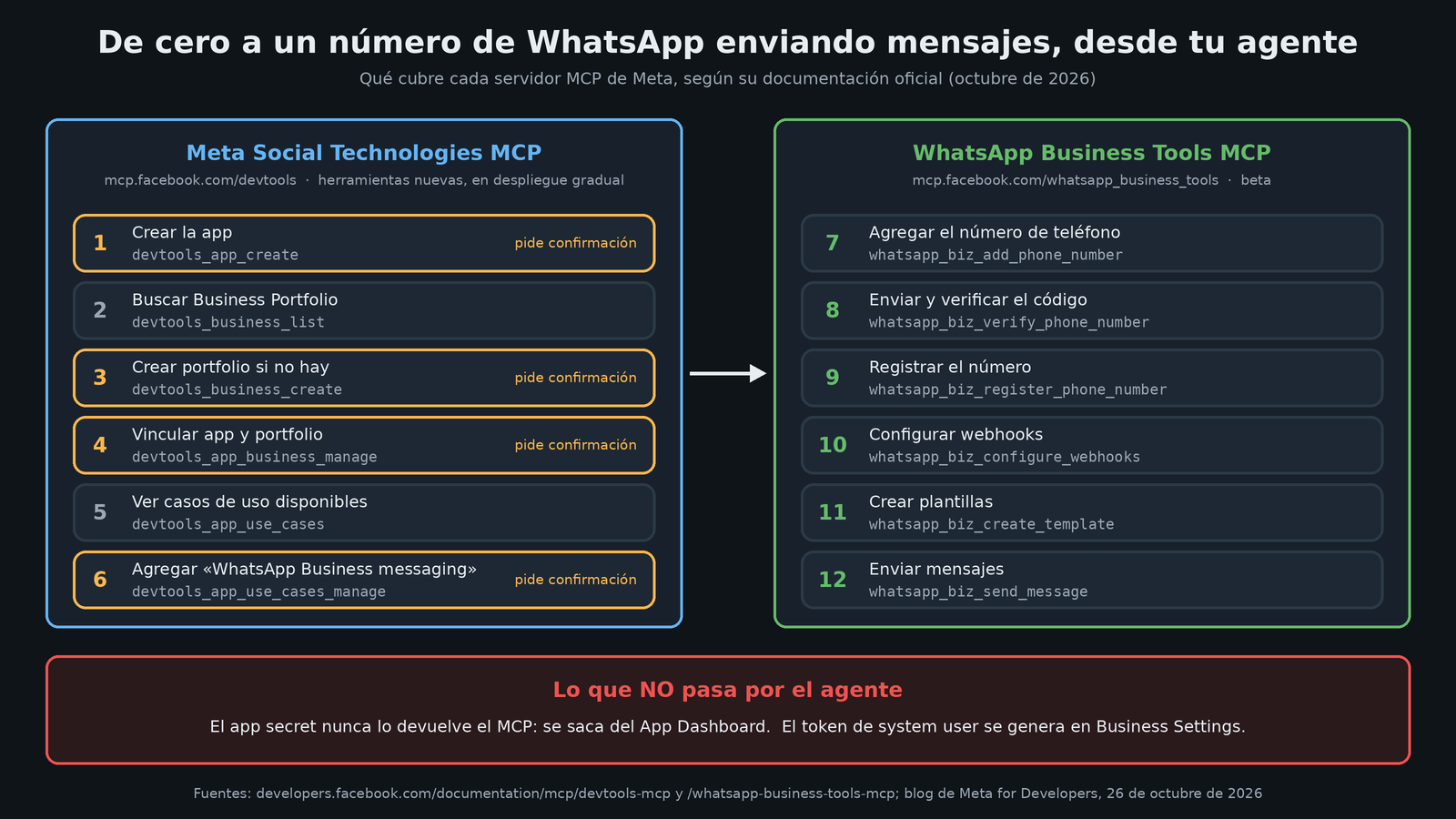
Building a WhatsApp bot with the official API has always started the same way: half an hour of clicking around the Meta dashboard before you write a single line of code. Create the app, find the right Business Portfolio, link them, add the WhatsApp use case. On October 26, Meta announced on its developer blog that the Meta Social Technologies MCP server can now handle that setup from an AI agent: six new tools that cover everything from creating the app to adding "WhatsApp Business messaging" to it. Combine it with the other server Meta has for WhatsApp, and the path from "I have nothing" to "my number is already sending messages" fits, on paper, inside a conversation with Claude, Cursor, Codex or ChatGPT.
Heads-up upfront: I haven't tested it. Everything below comes from the announcement and Meta's official documentation, and anything that's my own interpretation is marked as such.
Which server are we talking about?
Meta introduced this MCP on June 30, 2026 under a different name, Developer Tools MCP. Since August 18 it's called Meta Social Technologies MCP, although the endpoint (https://mcp.facebook.com/devtools) and the devtools_ prefix on its tools didn't change, so old configurations keep working.
In its first version it was basically read-only. According to the documentation, it exposes 11 base tools to:
- Search Meta's developer documentation.
- List your apps and review their settings, security and restrictions.
- Check App Review status, pending compliance actions and violations.
- Measure API usage: rate limits, call volume and deprecations.
- List, create and test webhook subscriptions. Until now, that was the only place where it could write.
Authentication is OAuth on top of your Meta developer account: you no longer put an App ID or App Secret in the client configuration. On the consent screen you choose which apps to give it, and for each one there are two scopes: Read (read-only) and Manage (read plus webhook writes).
What's new: six tools for the app lifecycle
The October 26 announcement, signed by Zoë Lieberman, adds these six tools. The documentation gives the technical name of each one:
| Tool | What it does | Writes? |
|---|---|---|
devtools_app_create |
Creates a new app | Yes |
devtools_business_list |
Lists the Business Portfolios you've given it access to | No |
devtools_business_create |
Creates a Business Portfolio | Yes |
devtools_app_business_manage |
Links an app to a portfolio | Yes |
devtools_app_use_cases |
Lists configured or available use cases | No |
devtools_app_use_cases_manage |
Adds a use case, for example WhatsApp Business messaging | Yes |
Meta sells it with an example dialogue: you ask the agent "set up a new app for WhatsApp Business messaging" and it proposes the full plan (create the app, link it to your portfolio, add the use case) and asks for confirmation before each write. Their line is: "What used to be a sequence of dashboard visits is now a sentence".
The fine print that actually matters
The documentation includes several details that don't show up in the announcement and that can bite:
- Mandatory confirmation. The four tools that write ask for your approval before acting.
- The app secret never passes through the agent. Creating the app returns the
app_id, but the secret stays in the App Dashboard, behind a fresh authentication. Meta puts it bluntly: secrets are not shared in a conversation with an agent. - 15-per-day limit. Creating apps and creating portfolios each have a cap of 15 calls per day per user. Attempts count before they run, so a confirmation you reject, a failed validation or a confirmation that expires also burn an attempt. Meta asks that you not retry in a loop.
- Adding a use case can't be undone from the MCP. It grants the privileges that come with it and the server can't remove them afterward. That's why the tool is flagged as destructive for the agent.
- Creating portfolios requires an extra permission:
business_management, which is optional. If you don't grant it, everything else keeps working. - It doesn't move apps between portfolios. If the app already belongs to another portfolio, the link is rejected.
- The app is born in development mode, with no use cases and no portfolio.
Watch out for availability: the blog says the tools are rolling out gradually and may not show up for everyone yet. The documentation page, updated on October 7, still marks them as "coming soon". If you already have the server connected, Meta says you need to reconnect it so the agent discovers the new tools.
The other half: WhatsApp Business Tools MCP
Creating the app doesn't give you a bot. For that, Meta has a separate server, WhatsApp Business Tools MCP (https://mcp.facebook.com/whatsapp_business_tools), in beta and also rolling out gradually. Its documentation, updated on September 3, describes tools with the whatsapp_biz_ prefix to:
- List your businesses, WhatsApp accounts and numbers.
- Add a number, send the verification code, verify it and register it.
- Create, edit and delete message templates.
- Configure the webhook (callback URL and verification token) and subscribe the account.
- Send messages. Free-form text is only delivered within the 24-hour customer service window; outside of it, approved templates. The tool confirms the recipient before sending.
- Set up the payment method, check business verification and get a link to generate the system user token in Business Settings. The token is not generated inside the chat.
Its requirements are clear: be a business admin, be an admin of an app with the WhatsApp use case, and have accepted the Cloud API terms. That second requirement is exactly what the new tools on the first server now solve.
My take: what changes for people who build bots
What follows is opinion.
For agencies and integrators, the savings are in repetitive onboarding. Anyone setting up bots for several clients repeats the same sequence of clicks over and over. Handing it to an agent that explains it and asks for confirmation step by step cuts down on silly mistakes, like linking the app to the wrong portfolio. The 15-apps-per-day limit makes it clear Meta designed this for people, not app factories.
It's not production infrastructure. Everything runs in your name, with OAuth on your personal developer account, and the documentation for both servers says you have to log in again every time you restart the client. It's good for preparing and debugging from your editor. Your production bot keeps talking to the Cloud API with its system user token, as always.
The messaging permission deserves respect. The WhatsApp server asks for whatsapp_business_messaging, meaning the agent can send messages from your registered numbers. There's a confirmation before sending, but I wouldn't give that scope to an agent with real client numbers without being clear on what it's doing. The "no undo" on use cases points the same way: read what you're about to approve, don't just say "yes" to everything on autopilot.
The security design is well thought out. Having the app secret and the permanent token never touch the agent's context is exactly right. Meta's public repository even has a skill, debug-access-token, that diagnoses tokens without the token entering the agent's context.
How to connect it
According to the documentation, in Claude Code all you need is:
claude mcp add --transport http meta_social_technologies https://mcp.facebook.com/devtools
claude mcp add --transport http whatsapp_business_tools https://mcp.facebook.com/whatsapp_business_tools
Then /mcp to authenticate each one. Cursor, Codex and ChatGPT have their own instructions on the same pages. For clients that only accept local servers, Meta recommends the mcp-remote bridge. In addition, the facebook/agentic-tools repository (MIT license) includes plugins for Claude Code, Cursor and Codex with nine skills, among them /webhook-setup, /debug-webhooks and /app-review-prep. Meta says it will add more skills and plugins there.
Sources
- Developers can now create and configure an app for Social Technologies Dev Center using their agent, Meta for Developers (October 26, 2026)
- Meta Social Technologies MCP, official documentation
- WhatsApp Business Tools MCP, official documentation
- Announcing Meta Social Technologies MCP, Meta for Developers (June 30, 2026)
- facebook/agentic-tools repository on GitHub