On November 4, 2026, Cloudflare announced two things for anyone running sites behind its network: analytics that separate out traffic from personal AI agents (the assistants that browse, compare, or buy on a person's behalf) and policies to allow or block each of them individually. Until now, all of that landed in the same bucket of "automated traffic," and the only decision you could make was to treat every agent the same. It matters because behind each of those requests there is usually a customer waiting for an answer: if you block them blindly, you may be running off customers; if you let them through blindly, you may be opening the door to abuse.
The problem: a customer showing up disguised as a bot
Cloudflare lays out the scenario like this: a customer asks their agent to compare products from your store, look up a support article, or finish a purchase. To the site owner, all three look like automated traffic. According to the announcement, without knowing which agent is arriving and what it is doing, it's hard to tell whether that traffic helps the business or puts it at risk, and blocking everyone "can mean losing customers."
Since July, the company has already distinguished three AI behaviors that any customer can manage, even on the free plan:
- Search: crawlers that index your content to answer questions later.
- Agent: automation that acts in real time on behalf of a person, like bots that fetch a page for a chat or agents that drive a browser.
- Training: crawlers that take your content to train or fine-tune models.
What's new in November happens inside the Agent category: it's no longer a single knob for all agents.
What you can see now
In Security Analytics, the Bot Analysis chart adds a new category, Personal Assistants, next to Verified Bot, Likely Human, Likely Automated, and Automated. When you select it, you see only personal agent traffic over time.
In Top statistics there is a widget that lists which agents visit your site and how many requests each one sends. If you filter by an agent, the rest of the widgets adjust to show only its traffic: the paths it requests, the status codes it gets, and the networks it comes from. Cloudflare pitches it as a way to see at a glance whether an agent is logging in, reading product pages, reaching checkout, or running into errors on pages it can't use.
For sites with user accounts there is one more layer, but with fine print: Account Abuse Protection, which is still in early access. There, every login and signup event indicates whether a personal agent did it and which one. There's also a view of how many accounts use each agent, and each user's profile shows the agents acting for them. If someone appears to be using an agent to attack an account, the fraud team can mitigate that account with a WAF rule on its Hashed User ID, without blocking the agent for all the other users who use it.
What you can control
The setting formerly called Configure AI bot policies is now called AI Crawler and Agent access policies, and it lives in Security > Settings (filtering by Bot traffic). The mechanics, according to the documentation:
- You define a general policy for Agents.
- Each supported personal agent inherits it by default. If you change the general policy, they all update.
- Then you can override each agent's policy, one by one.
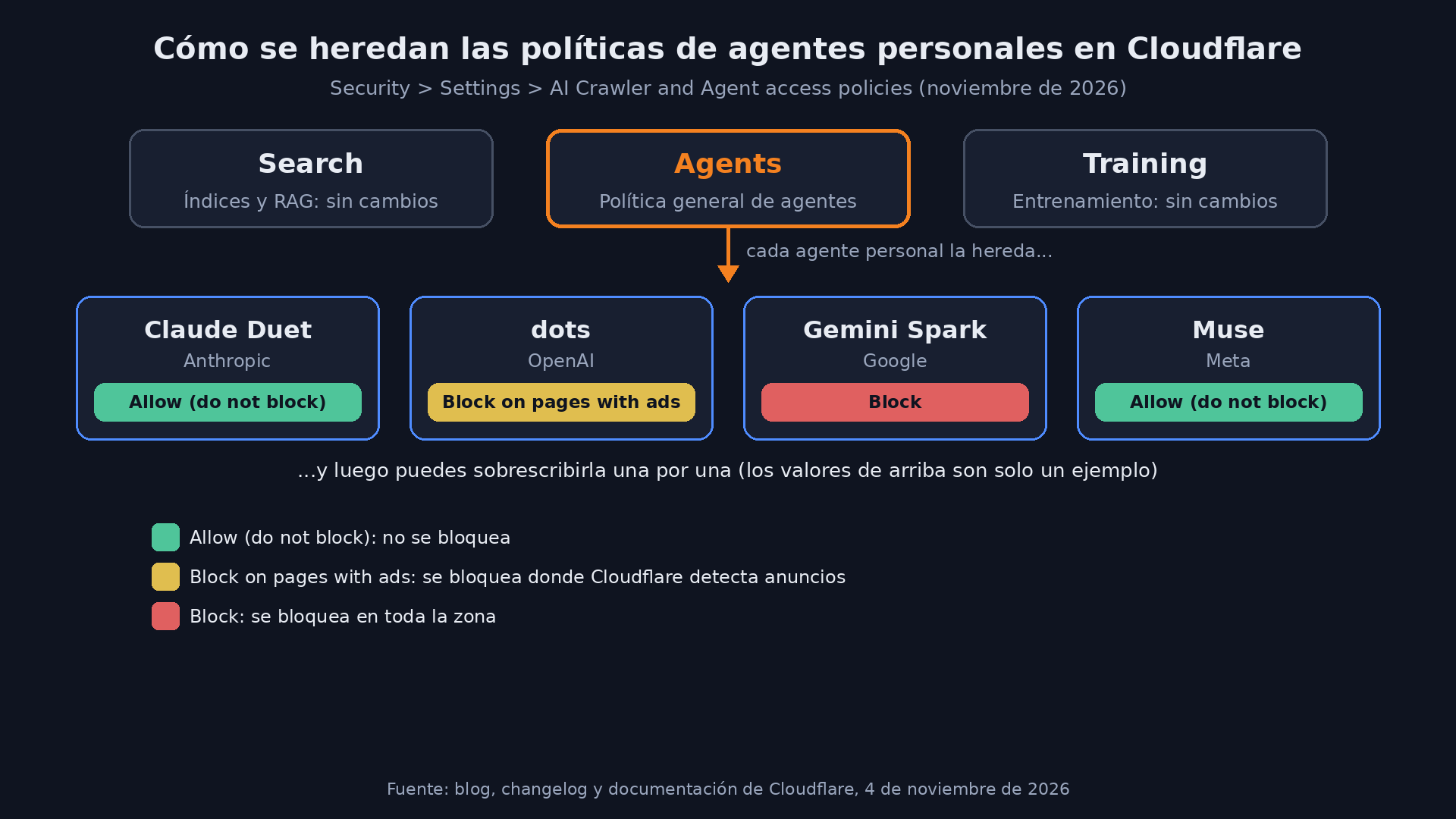
There are three available actions:
| Action | What it does |
|---|---|
| Allow (do not block) | Doesn't block requests from that agent |
| Block on pages with ads | Blocks only on pages where Cloudflare detects ads |
| Block | Blocks across the whole zone |
Cloudflare's example: you set the general Agents policy to "Block on pages with ads" and give "Allow" to a personal agent you do want to receive. The Search and Training policies don't change.
Which agents are those? The announcement text talks about "supported personal agents" without naming them, and the documentation says "the top" ones (top Personal Agents). The screenshot accompanying the changelog entry shows four: Claude Duet (Anthropic), dots (OpenAI), Gemini Spark (Google), and Muse (Meta). There's a fifth, Instinct, marked "Coming soon." Take it for what appears in that screenshot, not as a closed list: the official list lives in the dashboard and in Cloudflare's bot directory.
Watch out for the default values
This is worth reading carefully, because Cloudflare's sources don't say exactly the same thing depending on the date:
- In July, Cloudflare announced that starting September 15, 2026, new domains would have Training and Agent blocked by default on pages with ads, with Search allowed.
- The current documentation (updated November 2) says that for new domains Search, Agents, and Training are set to "Allow (do not block)" by default, and that Cloudflare recommends "Allow" for personal agents.
- The November 4 announcement adds that, when you onboard a zone, Cloudflare asks whether you monetize your pages with ads and adjusts the recommended policies based on your answer.
My take: don't assume which of those rules applied to your zone. If you onboarded it in recent months, go to Security > Settings and check what is actually set. It takes a minute and saves you from discovering three months from now that an agent has been bouncing off your checkout for weeks.
What it still doesn't solve
Cloudflare is upfront about this: knowing which agent makes the request doesn't tell you who the person behind it is. The site recognizes the agent, but doesn't know whether the user is already a customer, what they authorized the agent to do, whether they have a subscription, or what protections should apply to them. The company says its next goal is to carry that context through the agent in a privacy-respecting way, help assess reputation, and establish clear accountability when something goes wrong. It gave no dates; it says it will share more as it works with agent operators.
The verified bots documentation hints at where this is headed: Cloudflare distinguishes between direct bots (a single operator) and intermediary bots (a service used by many end users), and says it is experimenting with forwarding end-user information through the Forwarded header (RFC 7239) so the site can apply its preferences to whoever actually originates the request. It's an experiment, not an available feature.
What to do with this if you run sites
This comes from Cloudflare's documentation and announcement; I didn't test it in a dashboard. That said, my practical recommendation:
- Look first, then decide. Turn on the Personal Assistants view in Security Analytics and let it run for a few days before blocking anything. Pay attention to the paths: an agent that only reads your documentation is not the same as one that hits
/logina hundred times per minute. - Check the status codes. If an agent gets lots of 403s or 5xx errors on pages you do want it to use (pricing, support, bookings), you probably have another WAF or bot rule hitting it without your knowing.
- Split by business model. If you live off ads, "Block on pages with ads" makes sense as a general policy, with exceptions for the agents that bring you readers. If you sell something, blocking agents at checkout is literally closing the register on a customer.
- Mind the layers. This policy stacks on top of whatever you already have: WAF rules, Bot Fight Mode, rate limiting,
robots.txt. An "Allow" here doesn't undo a block you set somewhere else. - For user accounts, the fine-grained part (seeing which agent each account uses and mitigating just that account) depends on Account Abuse Protection, which is still in early access. If you don't have it, for now your control is per agent, not per user.
What this means, as I read it, is that Cloudflare is pushing an idea that's going to become standard: an AI agent is neither just any bot nor just any human, it's an intermediary, and every site will have to decide who it does business with through it. Today you can already make that decision agent by agent. The hard part is still missing: knowing who is sending the agent.
Sources
- Cloudflare: See the agents, set the terms: new visibility and control for personal agents (official announcement, November 4, 2026)
- Cloudflare Changelog: Granular access controls for the top Personal Agents
- Cloudflare documentation: AI Crawler and Agent access policies
- Cloudflare: Your site, your rules: new AI traffic options for all customers (July 2026)
- Cloudflare documentation: Verified bots
- Unite.AI: Cloudflare Adds Personal Agent Analytics and Per-Agent Access Controls