If you onboard customers onto the WhatsApp API with Embedded Signup, the Meta popup where your customer connects their number and their account, that flow just gained a screen. On November 11, 2026, Meta announced in the platform changelog that it added a display name screen to the v4-public-preview and v5-public-preview versions for all business customers. That's where the customer types the name WhatsApp users will see instead of the business phone number. Right now it only shows up in the preview versions, but Meta has already said it will reach v4 and v5 "later", with no date, and asks you to test your integration against the preview versions now. Translation: if your onboarding assumes the popup has X steps, or if it sets the number's name on its own afterward, today is the day to review it, not the day the screen shows up in production and your support inbox fills up.
What Meta announced, word for word
The changelog entry is short. According to Meta:
- The display name screen was added to
v4-public-previewandv5-public-previewfor all business customers. - It appears after the customer selects or creates their business assets (portfolio and WhatsApp account).
- On that screen the customer types the display name for their business number.
- The screen will be rolled out to v4 and v5 later, so Meta recommends "testing your integration against the public preview versions now".
The v4-public-preview page, updated that same November 11, says it more clearly: that version "always shows" the screen, and it's worth testing against it "so the screen doesn't break" your integration when it arrives in v4.
How the screen works
The documentation for the display name screen gives several details that matter if you build the onboarding yourself:
- It asks for the name WhatsApp users see instead of the number of the business. Embedded Signup adds the number with the name the customer types there.
- The name is validated against the display name guidelines as the customer types. The Next button stays disabled until the name passes.
- Passing that validation is not final approval: Meta keeps reviewing the name after the flow ends.
- If the customer picks a number that already existed and whose name isn't approved, they can type a new one on this screen.
- Embedded Signup skips the screen in three cases: numbers that already have an approved name, number migrations, and onboarding of WhatsApp Business app users (the Coexistence flow).
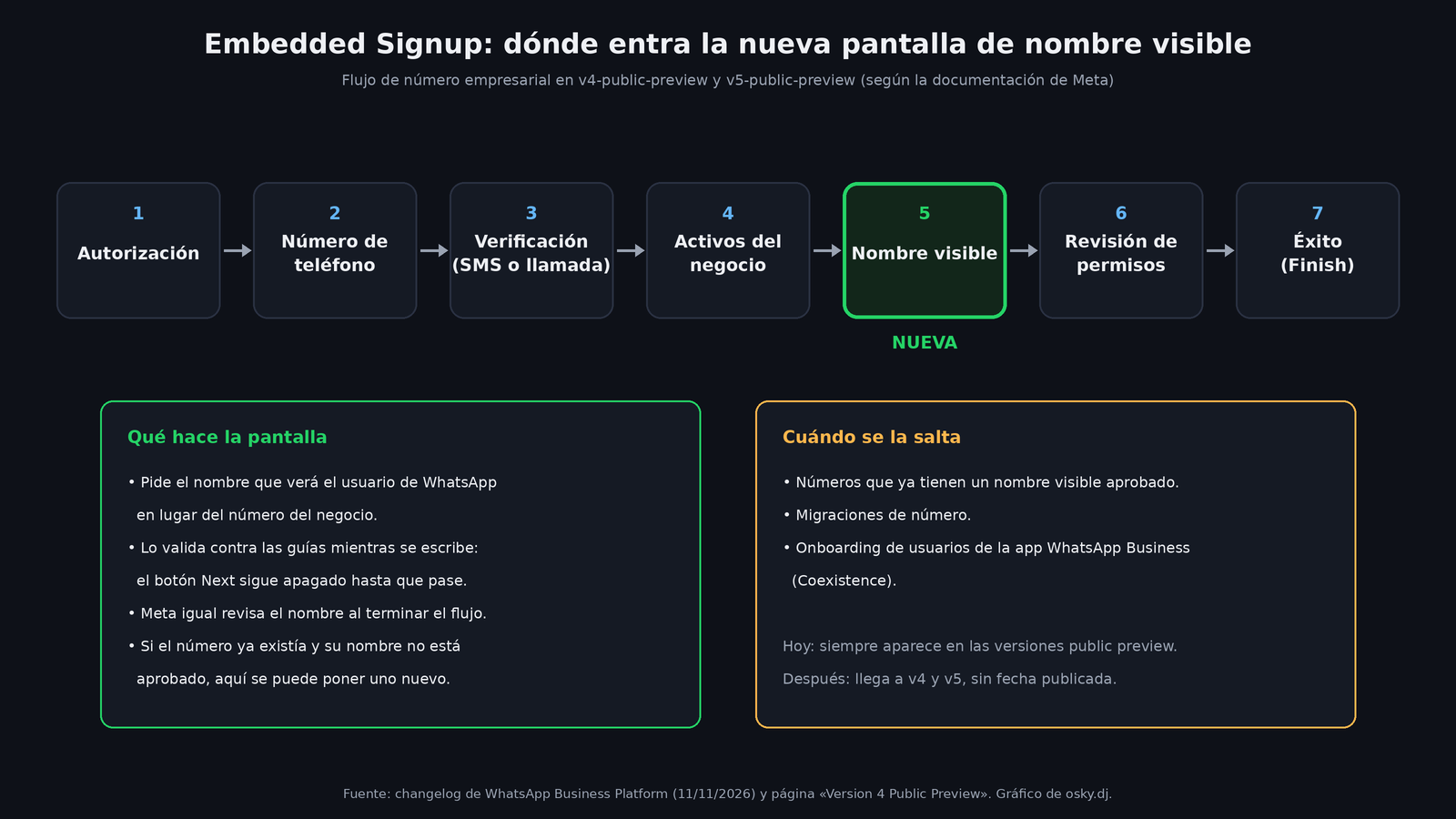
In the business number flow as Meta describes it, the order goes like this: authorization, number signup, verification by SMS or call, asset selection or creation, display name, permissions review, and success screen. When the customer hits Finish, the popup sends the event with the IDs you use to finish onboarding the customer, just like before.
Where each version stands
To place the change, it's worth recalling the version map Meta maintains on its versions page:
| Version | Since | Display name screen |
|---|---|---|
v5-public-preview |
October 20, 2026 | Yes, since November 11 |
v5 |
October 20, 2026 | Not yet; coming later |
v4-public-preview |
May 12, 2026 | Yes, since November 11 |
v4 |
October 8, 2025 | Not yet; coming later |
v2 and v3 (and their previews) were deprecated on October 15, 2026; requests that still ask for them, or that don't send a version, are served as v4. The public preview versions are the same version with the new interface. To test, just change the version inside extras, for example version: "v5-public-preview". According to the v5 documentation, that version also comes with WhatsApp Business app onboarding turned on by default and a different session object (version 5), with messaging_account_ids instead of waba_id. If you're going to migrate from v4 to v5, that's another change your code has to absorb, separate from this screen.
What could break in your integration
What follows is my reading, not something Meta has listed. I haven't tested it; it comes from the official Embedded Signup documentation.
1. Assuming you set the name afterward. Many BSPs and agencies let the customer finish the popup and then, from their dashboard, set the number's name via API (new_display_name) or in WhatsApp Manager. With the new screen, the name already comes from the flow. If your dashboard asks for the name again, your customer will type it twice, and if they type something different, now you have two versions of the same name. The display names page reminds you that a name can be changed 10 times every 30 days and that, once a change is approved, you have to re-register the number (POST /<PHONE_NUMBER_ID>/register) within 14 days for it to take effect. Duplicating that step needlessly burns attempts and adds another round of review.
2. Outdated tutorials and screenshots. If your documentation, your onboarding video, or your support team's script says "after choosing the WhatsApp account, the permissions screen comes next", that's no longer true. It's the easiest thing to fix and the one that generates the most tickets if you don't.
3. Customers getting stuck. The Next button doesn't enable until the name meets the guidelines. Meta's guidelines ask, among other things, that the name genuinely represent the business, that it not be a generic term ("Fashion" doesn't pass) or a generic location ("New York" doesn't either), and that it have a clear relationship to the business's legal name or brand. A customer who tries to enter just "Sales" or "Support" will end up staring at a gray button. If your onboarding is assisted, it's worth explaining this before opening the popup.
4. Pre-filled data. The pre-filled data guide already lets you send setup.phone.displayName when opening Embedded Signup. The documentation for the new screen doesn't say whether that value fills it in or skips it, so that's exactly what you need to confirm in preview before the screen reaches v4.
5. Drop-off metrics. If you measure at which step your customers abandon the popup (according to the implementation guide, the CANCEL event carries current_step with the screen where the customer dropped off), you'll see a new step. Don't mistake it for a problem on your end.
What we still don't know
- The date it arrives in v4 and v5: Meta only says "later".
- Whether the rollout will be gradual by app or by customer, or all at once.
- Whether a pre-filled
setup.phone.displayNamefills in or skips the screen. - Whether the live validation uses exactly the same criteria as the later review. Meta makes clear the review still exists, so passing the screen doesn't guarantee approval.
What I'd do this week
My recommendation, with what's published: open your signup flow with version: "v4-public-preview" (or v5-public-preview if you're already on v5) in a test environment and run through it with a new number, an existing one with an approved name, and one without approval. Check that your message listener still receives the completion event the same way, that your dashboard doesn't ask for the name again, and that your documentation shows the new screen. It's half an hour of work that saves you the day Meta turns it on in v4 without giving a date.
Sources
- Changelog de WhatsApp Business Platform, 11 de noviembre de 2026 (Meta)
- Embedded Signup: Version 4 Public Preview, pantalla de nombre visible (Meta)
- Embedded Signup: Version 5 Public Preview (Meta)
- Embedded Signup: Version 5 (Meta)
- Embedded Signup: versiones disponibles (Meta)
- Display names: verificación, cambios y re-registro (Meta)
- Display name guidelines for the WhatsApp Business Platform (Meta Business Help Center)
- Embedded Signup: datos precargados (Meta)
- Embedded Signup: implementación y eventos de sesión (Meta)