On November 12, 2026, Meta added a new setting to the WhatsApp Calling API: call_permission_mode. It does just one thing, but it's an important one: it decides whether your business number can call users without them having given you permission first, or whether it stays in the classic model where you only call people who approved it. A week ago Meta started automatically enrolling eligible numbers in that "quality-based" model, and the new documentation confirms what wasn't visible back then: for now it applies to numbers with Mexico and Colombia country codes. If you run a bot or a call center with Mexican numbers, this switch is yours, and you should know which position it's in.
The context: from "ask for permission" to "call, unless they tell you no"
We already covered on osky.dj the November 6 change. According to Meta's changelog, eligible numbers in "specific countries" are automatically enrolled in quality-based business-initiated calling when the Calling API is enabled, and those that already had it active were migrated on their own. In that model you can call without prior approval, unless the user has rejected the permanent permission or revoked one they had already given.
When we wrote that piece, the public guide didn't show the details yet. Now it does. The quality-based calling section is marked as "limited availability" and says it applies to eligible numbers with Colombia and Mexico country codes. It also clarifies three things that change the logic of any integration:
- The permissions you already had are still valid after the migration: you can keep calling anyone who approved you.
- Only the permanent permission counts. The quality model doesn't use temporary permissions (the 7-day ones) or the ones generated by the callback when the user calls you. The call permissions guide repeats it:
callback_permission_statuspermissions don't apply in this model. - There are tier limits, counted over a rolling 24-hour window per number.
What call_permission_mode does
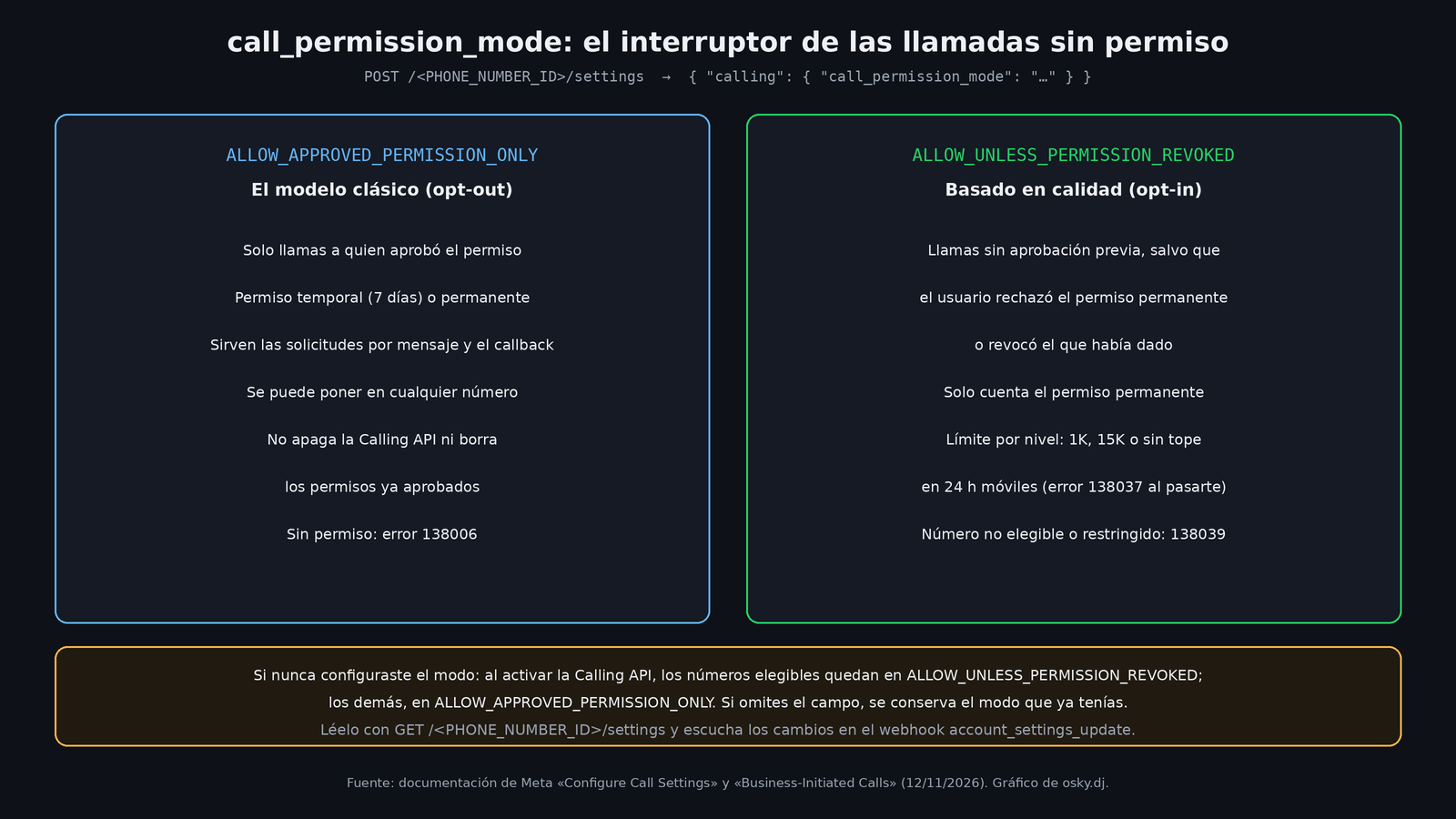
The setting lives in the same call configuration endpoint, POST /<PHONE_NUMBER_ID>/settings, inside the calling object. According to the Configure Call Settings documentation, it accepts two values:
ALLOW_APPROVED_PERMISSION_ONLY: you leave the quality model and go back to requiring approved permission to call. Meta says you can set it on any number, that it doesn't disable the Calling API, and that it doesn't revoke permissions you were already granted.ALLOW_UNLESS_PERMISSION_REVOKED: you enter the quality model. For that, your number has to meet the eligibility requirements, have the Calling API enabled, and have business-initiated calls available.
The field is optional. If you omit it, the mode you already had is kept. If you never configured one, when the Calling API is enabled eligible numbers end up in ALLOW_UNLESS_PERMISSION_REVOKED and the rest in ALLOW_APPROVED_PERMISSION_ONLY (unless they were already configured to call without prior approval). In other words: if your Mexican number is eligible and you didn't touch anything, it's most likely already in the no-permission mode. Don't assume it; the way to confirm is further down.
To enable calling and enter the model in a single request, Meta says to send "status": "ENABLED" and "call_permission_mode": "ALLOW_UNLESS_PERMISSION_REVOKED" together. The minimum body to opt out is this:
{
  "calling": {
    "call_permission_mode": "ALLOW_APPROVED_PERMISSION_ONLY"
  }
}
A new error and a new webhook
If you try to enter the quality model with a number that isn't eligible, or one whose outbound calls were recently restricted for poor quality, the API responds with code 138039, and the reason comes in error_data.details. The other call availability errors still apply if the Calling API or business-initiated calls aren't available on that number.
To find out which mode you're in, GET /<PHONE_NUMBER_ID>/settings now returns call_permission_mode inside calling. And to find out when it changes, there's the account_settings_update webhook. According to Meta, it notifies about changes in status, call_icon_visibility, callback_permission_status, call_permission_mode, sip.status and srtp_key_exchange_protocol, even when you made the change yourself. To receive it, the app has to be subscribed to that field and to the number's messaging account, and have the whatsapp_business_management permission. The documentation itself gives a quick test: if you can read the settings with that app's token, it can receive the webhook.
The quality model's limits
The business-initiated calls guide defines four tiers per number, measured over a rolling 24 hours:
| Tier | Call attempts without approved permission |
|---|---|
CALLING_TIER_NO_ACCESS |
The model isn't available |
CALLING_TIER_1K |
Up to 1,000 |
CALLING_TIER_15K |
Up to 15,000 |
CALLING_TIER_UNLIMITED |
No tier cap (the Calling API's other limits still apply) |
The details that matter:
- Only attempts to users without approved permission count. Calls to people who already gave you permission don't use up your quota.
- Eligible numbers start at 1K. Meta moves you up automatically based on sustained usage, call quality, account status and active restrictions, among other factors. You can't request it.
- When your tier changes, a
CALLING_TIER_UPDATEevent arrives through theaccount_updatewebhook. - If you go over the cap, the API responds with
138037and you have to wait for the old attempts to leave the 24-hour window. - Poor quality can temporarily restrict your outbound calls. The settings page describes that, if complaints and blocks pass a threshold, Meta pauses business-initiated calls for 7 days.
My take: why someone would want to turn it off
Meta letting you call without asking for permission doesn't mean it's good for you. What this means in practice, as I see it:
- Your reputation becomes a resource you spend. In the classic model, the person already said "yes, call me" before the phone rang. In the quality model, every cold call is a chance of getting blocked or reported, and that's exactly what Meta uses to decide your tier or punish you with the 7-day pause. A collections or sales bot that dials automatically can burn through a number in one afternoon.
- Old code can make decisions with data that no longer applies. If your integration checked "do I have a temporary or callback permission?" before dialing, in the quality model those permissions don't count. And if your logic assumed that without permission the call fails with
138006, now it might actually go through. - Some businesses shouldn't call without permission, even if they can. I'm thinking of clinics, law firms, or any operation where an unsolicited call looks invasive or clashes with their privacy notices. For them, setting
ALLOW_APPROVED_PERMISSION_ONLYis the explicit, auditable way of saying "we only call people who asked for it." - For those who do take advantage of it, the appeal is clear: confirming appointments, notifying about a delivery or following up on a purchase without first sending the "can I call you?" template, which on top of that is billed as a message.
What to check if you have numbers with Calling API
I haven't tested it; this list comes from Meta's official documentation.
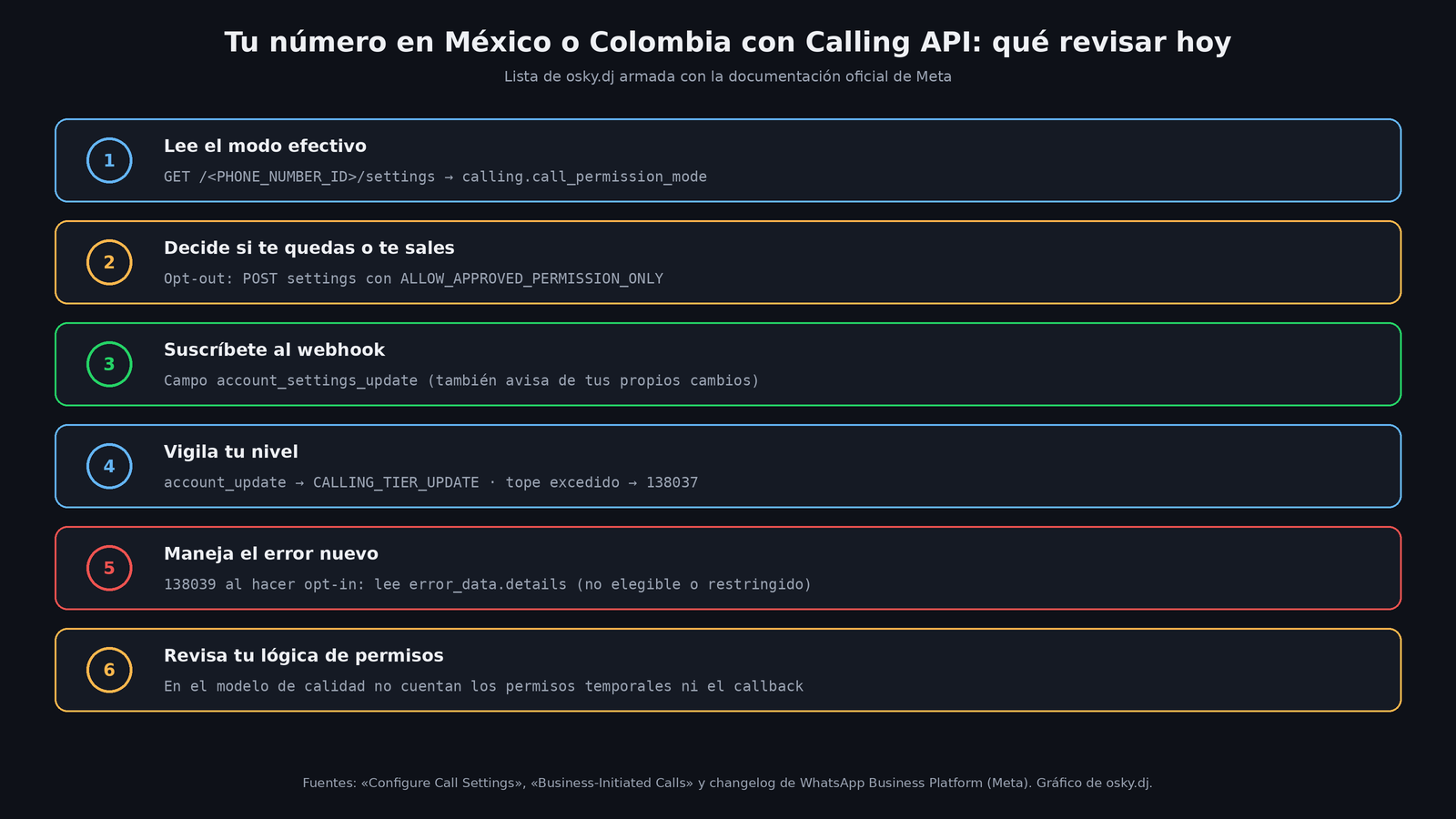
- Read the effective mode of each number with
GET /<PHONE_NUMBER_ID>/settings. If you have several clients, do it number by number: the setting is per business number, not per account. - Decide with the client whether it stays in the quality model or opts out. If it opts out, send
ALLOW_APPROVED_PERMISSION_ONLY. - Subscribe to
account_settings_updateso a change made from WhatsApp Manager or by another integrator doesn't catch you off guard. - Listen for
CALLING_TIER_UPDATEinaccount_updateand pause your campaigns before you hit138037. - Handle
138039when opting in and saveerror_data.detailsin your logs. - Review your permissions logic. If you relied on temporary or callback permissions, they're no use to you in the quality model.
What's still unknown
The documentation talks about "eligibility requirements" but doesn't list them one by one in the pages we reviewed, and it doesn't say when the model will reach other countries either. It also doesn't publish the exact quality thresholds that move a number between tiers. Until that shows up, the prudent move is to treat the 1,000-attempt quota as the real ceiling and measure blocks and reports from day one.
Sources
- WhatsApp Business Platform changelog, November 12, 2026: call_permission_mode (Meta)
- Configure Call Settings: call_permission_mode and account_settings_update webhook (Meta)
- Business-Initiated Calls: quality-based calling and tier limits (Meta)
- WhatsApp Business Platform changelog, November 6, 2026: automatic enrollment (Meta)
- Obtain user call permissions (Meta)
- Troubleshoot WhatsApp Calling Errors (Meta)
- WhatsApp now lets some businesses call without asking for permission first (osky.dj)