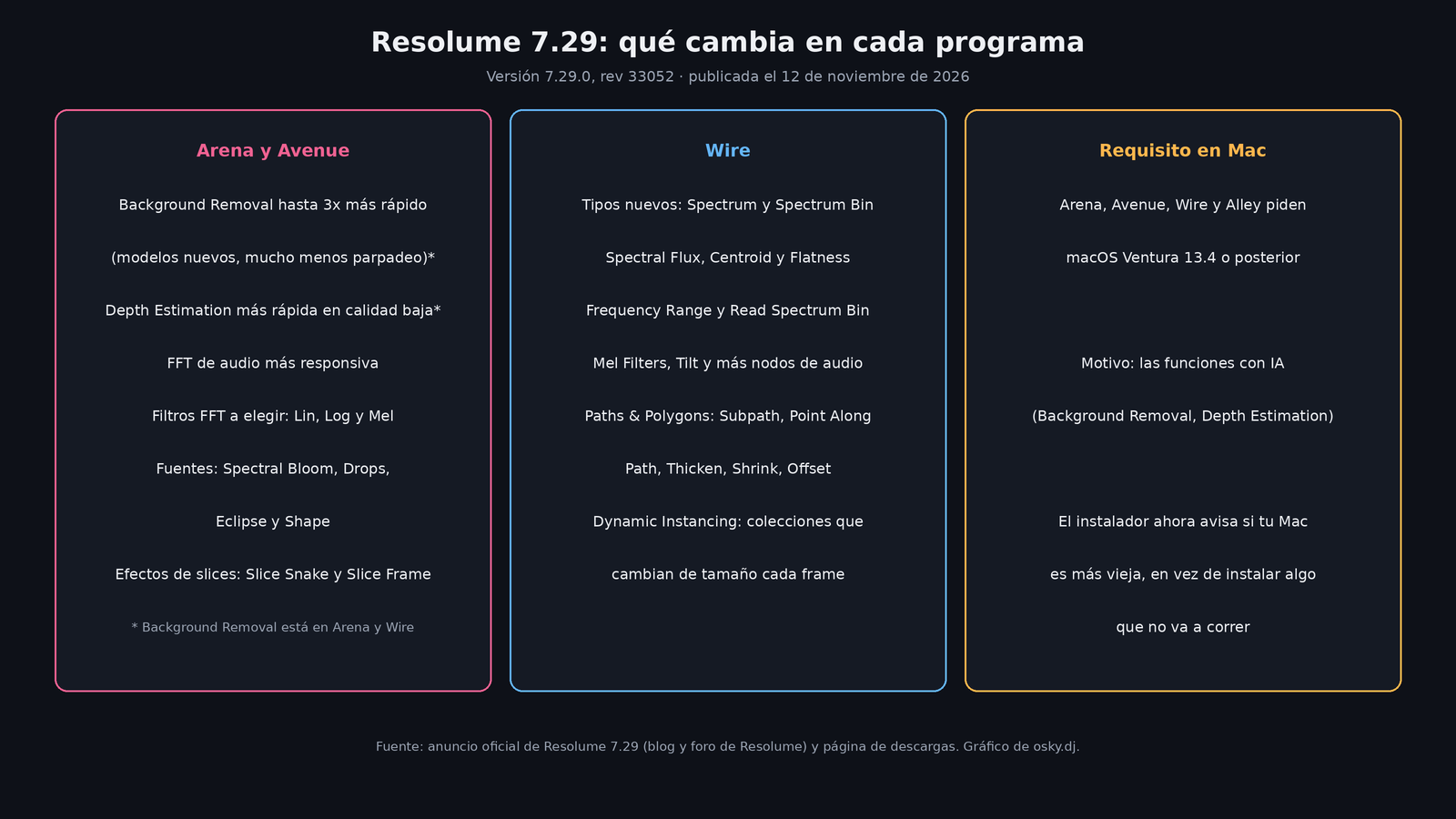
Resolume released version 7.29 of Arena, Avenue, Wire and Alley on November 12, 2026, and it's one of those updates that actually changes what happens in the booth. The most anticipated part: the AI background removal that arrived two months ago is now up to three times faster and flickers a lot less. On top of that, audio reactivity (the FFT that moves parameters with the music) has been reworked and now lets you choose between three scales: Lin, Log and Mel. Wire, the node-based environment, gets tools for building audio visuals from scratch, and there are four new generative sources and two new effects for slices. Watch out for the detail that can wreck your soundcheck: on Mac you now need macOS Ventura 13.4 or later.
Background removal, second chance
In version 7.28, from September, Resolume brought in computer vision: a person segmentation model to separate the subject from the background and a depth estimation model, with effects like Depth Blur, Depth Displace or a depth-based blend mode. In the 7.29 announcement, the company itself admits that a lot of people got excited and then disappointed because it was "often too slow".
The answer was to swap out the models. According to Resolume, background removal is now up to 3x faster, "much more stable" and with far less flicker. Depth detection was also sped up, although the announcement clarifies that this applies with the low quality setting. The 7.29 announcement places background removal in Arena and Wire.
My take: that "up to" matters. Resolume didn't publish what hardware, resolution or quality setting it used to measure the 3x, so there's no way to know how much you'll gain on your machine. The sensible thing is to test it with your camera, your resolution and your GPU before promising a client a show with the background cut out live. If you wrote it off as too slow in 7.28, it's worth giving it another look; the team itself asks for exactly that: "Give it another go!".
FFT redone: Lin, Log and Mel
The FFT is the analysis that splits audio into frequency bands so that a parameter (opacity, scale, color) moves with the kick, the mids or the cymbals. In Arena and Avenue, Resolume says it's now "much more responsive" and that you can choose between three filters: Lin, Log and Mel. The announcement doesn't go into detail and sums up the decision with humor: pick whichever one makes your parameters "go boom".
Since Resolume doesn't explain it, here's what those scales mean in general, without this being a description of their implementation (which they didn't publish):
- Lin (linear): every band is the same width in hertz. Since most of the range is in the highs, almost all the bands land there and the lows get crammed into very few.
- Log (logarithmic): each band covers the same proportion of frequency, similar to how octaves are counted. The distribution is closer to how we hear.
- Mel: a perceptual scale, nearly linear in the lows and logarithmic in the highs. It's widely used in voice analysis and machine learning.
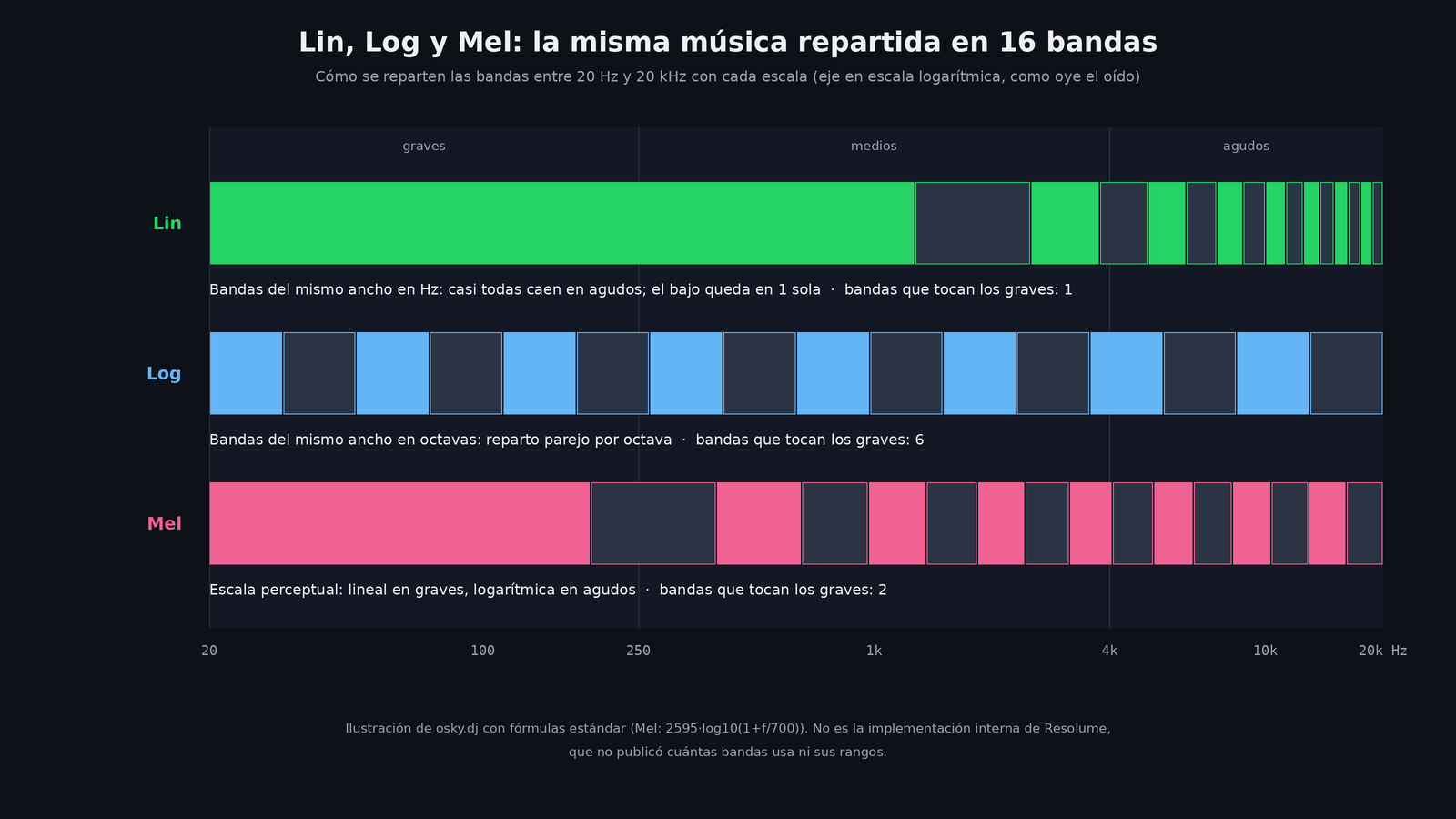
For anyone playing tech house or techno, the practical upshot is clear: if your visuals need to hit the kick and the bass, a scale that dedicates more bands to the lows gives you finer control right where the groove lives. On a linear scale, the kick and the bassline can end up sharing the same band. I haven't tested it; this comes from Resolume's announcement and from how these scales work in general.
There's another recent change that helps here: in 7.28 you could already choose a group's FFT as the source for the animations of clips and layers living inside that group.
Wire: audio, paths and instances that change every frame
Wire is where the work in this release shows the most. According to the announcement, the improved audio analysis also comes to Wire, with two new data types:
- Spectrum: the full picture of the audio's frequencies at a given instant.
- Spectrum Bin: a single slice of that spectrum, one band with one value.
Around those types there's a family of nodes. Spectral Flux measures how fast the energy changes, and Resolume recommends it for detecting attacks (onsets), that is, the moment a hit comes in. Spectral Centroid tells you whether the sound is dark or bright, and Spectral Flatness, whether it's tonal or noisy. Frequency Range and Read Spectrum Bin isolate just the frequencies you care about, and there are additional nodes for summing bins, Mel filters and Tilt.
Paths & Polygons also arrive: turn a collection of points into a path or a polygon, cut a subpath, find a point along the path, thicken a line to turn it into a shape, shrink it or offset it. Animate the subpath and you get the classic self-drawing line effect, and if you feed it spectrum data, according to Resolume, you can build an oscilloscope, a waveform or a spectrum ring "with just a few nodes".
The third change is more technical but removes an old limitation: Dynamic Instancing. Before, Wire's collections had a fixed size that could only change in one type of flow; now the number of elements can change on every frame and in any flow. In practice, patching becomes less restrictive.
This fulfills what Resolume previewed in September, when it said it was improving its audio engine and that 7.29 would bring spectrum features, path drawing and effects for slices.
Generative sources and slice effects
For those who don't want to patch anything, 7.29 brings ready-made content:
- Spectral Bloom: each frequency band shoots a beam of color as far as it sounds loud, with an audio-guided stream and a five-sector kaleidoscope fold.
- Spectral Drops: dark water struck by the music. Underneath runs a real wave equation: each attack drops a ring, the lows fall near the center and the mids and highs farther out. Each band is measured against its own recent peak, so quiet material makes ripples too.
- Spectral Eclipse: per-band rays emerging from behind a dark disc with a glowing edge.
- Spectral Shape: a source of circles that react to FFT signals.
- Slice Snake: animated outlines for whole slices or parts, with different lengths per slice.
- Slice Frame: uses the incoming video to create textured borders on slices, with animatable repeats and offsets.
The two slice ones speak directly to anyone doing mapping: outlining surfaces used to be a job for masks and custom-made content.
The requirement you can't ignore: macOS Ventura 13.4
Arena, Avenue, Wire and Alley now require macOS Ventura 13.4 or later. Resolume explains that the AI features, like background removal and depth estimation, need it. The good news is that the installer now warns you if your Mac has an older version, instead of letting you install something that won't launch.
If your show laptop is still on Monterey or something older because "it works and you don't touch it", don't update on the day of the event. The downloads page keeps the previous versions, including 7.28.1 from October 6, in case you need to stay where you are.
What we still don't know
- The 3x has no context. There's no reference hardware, resolution or setting.
- There's no fix list in the announcement. For 7.28 Resolume published the list of resolved bugs; the 7.29 one doesn't include it.
- How the filters work internally wasn't published: how many bands, what ranges or how they're smoothed.
Sources
- Resolume 7.29 Release: Faster Background Removal, Improved Audio FFT, Paths & Polygons, Dynamic Instancing (Resolume blog)
- Resolume 7.29 announcement on the official Resolume forum
- Resolume downloads page: version 7.29.0 rev 33052 from November 12, 2026
- Resolume 7.28 Release: Background Removal and Depth Effects (Resolume blog)