
Sorting music also means throwing things out. Until now Osky Audio Player could only move files: every track ended up in some folder, even when that folder really meant "I'm never touching this again". Two commits on November 16 changed that. The player can now send a track to the trash with a single key, bring it back with Ctrl+Z, set up a new folder in one click and show you what's coming next.
All in all, nine files changed, with 327 lines added and 35 removed.
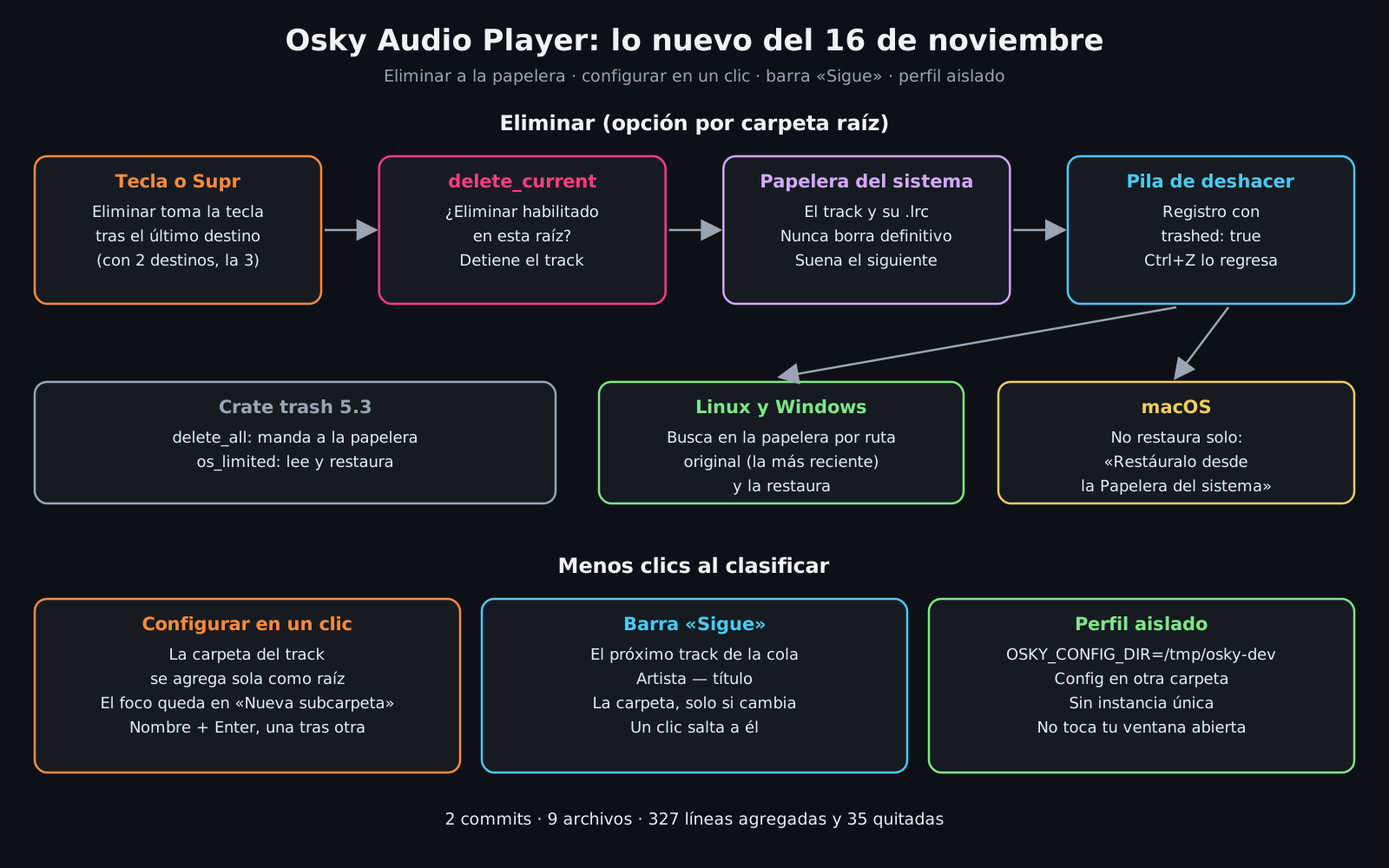
Delete, but to the trash
The first commit adds a "Delete" button that you enable per root folder, not globally. It makes perfect sense in a downloads folder; in a folder of already-curated tracks, better that it doesn't even show up.
The button takes the key right after the last destination (with two destinations, 3), so the loop is still a single key, and Del works too. The track goes to the system trash along with its .lrc, it's never permanently deleted, and the next one starts playing. If the subfolder ends up empty, it gets cleaned up just like after a move.
The piece that does it is short and uses the trash crate:
pub fn trash_track(src: &Path) -> Result<Vec<(PathBuf, PathBuf)>, String> {
    let mut paths = vec![src.to_path_buf()];
    paths.extend(sidecars(src));
    trash::delete_all(&paths).map_err(|e| format!("No se pudo mandar a la papelera: {e}"))?;
    Ok(paths.into_iter().map(|p| (p.clone(), p)).collect())
}
Undo, for deletions too
Every deletion goes onto the same stack as moves, flagged as trashed. When you hit Ctrl+Z on Linux or Windows, the app reads the trash, finds the file by its original path (the most recent one if there are several) and restores it. If another file already sits at that path, it refuses instead of overwriting it: the same "never overwrite" rule moves already had, applied to the way back.
I tested it on Linux and it works well: I delete, hit Ctrl+Z and the track goes right back where it was.

One-click setup and a look at what's next
One-click setup. Before, when you opened a track from an unconfigured folder, the "Configure this folder" button opened the settings and suggested the folder one level up as the root. With the second commit, the track's own folder is added as a root automatically and the cursor lands on the new-subfolder field. After you create one, it stays there for the next: name, Enter, name, Enter.
The "Up next" bar. Below the player you now see the next track in the queue: artist and title when the tags have them, the file name when they don't, and the folder only when it changes, so you know you're about to finish a subfolder. One click jumps to it. A small detail that adds context without getting in the way.
An isolated profile for development. With OSKY_CONFIG_DIR the app stores its config in a different folder and turns off single-instance mode. That way I can test without touching my real config or the window I already have open. Beyond convenience, it's the groundwork automated tests need.
What I still need to fix
- Undoing a delete on macOS. The README promises
Ctrl+Zbrings back what you deleted, but restoring is only implemented on Linux and Windows; on macOS you have to pull it out of the Trash by hand. And since a failed undo pushes the record back onto the stack, after a delete on macOS that record stays on top and blocks undoing earlier moves for the rest of the session. I'll keep it off the stack on that platform, or at least skip over it. - Automated tests.
restore_from_trashjoins the most delicate parts of the project, alongside moving and undo, and it's exactly what's easiest to test with temporary folders. The isolated profile already clears the path.
What's next
Tests for the library, trash included; fixing undo on macOS; and a workflow that builds the Linux, Windows and macOS installers, so any DJ can try it without installing Rust.
If you want to know what Osky Audio Player is, how it's built and why it exists, read the first review: Twelve seconds and one key.