On October 27, Native Instruments released Massive XL, the third generation of the synth that half the planet used to learn how to make dubstep basses, and which came out exactly 20 years ago. It's not a synth built from scratch: it takes the engine from Massive X (2019) and adds an audio-based preset generator, patch mutation inherited from Absynth, custom wavetables, polyphonic aftertouch and a pretty heavily redesigned interface. It costs 199 dollars, but for now it's selling for 99. There's also a free version, Massive XL Player. For anyone producing bass music, techno or whatever else with wavetable synths, the practical question is whether it's worth upgrading, and the answer depends on how much you use Massive X today.
Before going on, a disclaimer: I haven't tested it. Everything below comes from Native Instruments' official documentation, its product page, and coverage from MusicRadar and CDM.
Generate: from a sample to an editable preset
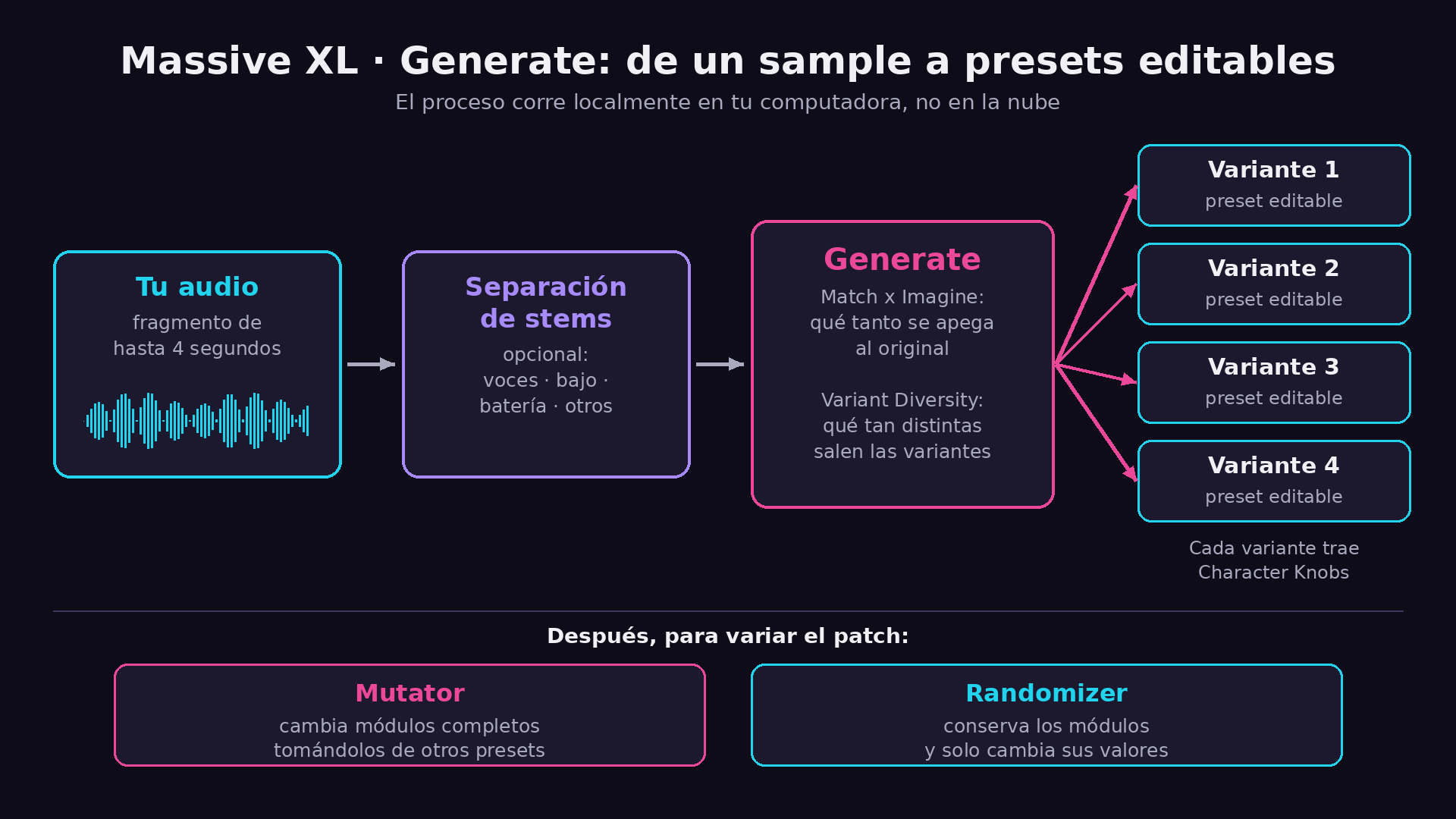
This is the feature that's going to make the most noise. You drag an audio file onto the Generate panel, pick a snippet of up to 4 seconds, and Massive XL gives you back four variations of that sound as regular presets, with every parameter editable. According to NI, the process runs locally on your computer, not in the cloud.
What you can adjust:
- Stem separation before generating, to isolate, for example, the bass from a full mix. MusicRadar details that it separates vocals, bass, drums and "other".
- Match x Imagine, which controls how closely the result sticks to the original audio.
- Variant Diversity, which sets how different the variations are from each other.
- Character Knobs, which let you tweak the character of the result in real time. MusicRadar reports six macros per variation.
As for training, NI says the model was trained only on internal data: pairs of a Massive XL patch with its parameters and the audio that patch produces. The company presents it as a starting point and not a destination. MusicRadar compares it to Synplant by Sonic Charge, which popularized the idea of turning audio into a patch.
A practical warning from the documentation itself: very loud files or ones with lots of low end can produce equally loud results, so turn the volume down before feeding it.
Mutator and Randomizer: variations without losing control
The Mutator is inspired by the one in Absynth. It swaps entire modules (filter type, oscillators, noise tables, inserts, effects and amplifier) by pulling them from other presets in your library, so the more presets you have, the more varied the results. The Randomizer does something else: it keeps the modules and only changes their values. For example, it moves the cutoff, but it won't switch the filter from Asimov to SVF.
You can mutate the whole patch or go module by module, and lock whatever you want to keep. MusicRadar adds that there are four levels of divergence. Peter Kirn, from CDM, says in his first hands-on that this, mutation working per module, was what he found most addictive.
What traditional sound design gains
- Custom wavetables: you drag an audio file onto the oscillator or import a whole folder. This was one of the most requested features from Massive users.
- Over 100 new wavetables (vintage PPG, acoustic instruments, tables from the original Massive and samples of analog hardware) and over 100 new noisetables. According to MusicRadar, they add to the more than 170 that Massive X already had.
- Three built-in NI effects: Raum (reverb with Airy, Grounded and Cosmic modes), Replika Shimmer and Tape Wobble.
- Freeze mode in the Morpher: locks the Morpher position on each note, so every note lands at a different point along the sweep without drawing any automation. NI says it works just as well live as in the studio.
- Polyphonic aftertouch: if your controller sends per-note pressure, the aftertouch assignments you already had, including those in old presets, automatically become per-note. It doesn't work on mono presets, Stereo FX or Performers. MusicRadar clarifies that there's no full MPE support.
- Workflow: animated modulators, envelopes you edit by dragging points, a single-oscillator view with a waterfall-style display, undo/redo history, a contextual help panel, user banks and per-module subpresets.
It ships with a factory library of 1,000 presets and is compatible with all Massive X presets and Expansions.
Price, requirements and what's not included
| Item | Detail |
|---|---|
| Regular price | 199 USD |
| Launch price | 99 USD (MusicRadar says it lasts until December 31; CDM says until January 3) |
| Upgrade | NI offers a discount to owners of previous products; you have to log in to see it |
| macOS | 14, 15 or 26; Intel with AVX or Apple Silicon |
| Windows | 64-bit 10 or 11 |
| RAM | 4 GB (6 GB recommended) |
| Formats | Mac: VST, VST3, AU, AAX. Windows: VST3, AAX |
| Download | 2.1 GB on Mac, 1.8 GB on Windows |
Things to consider:
- It only works as a plugin. There's no standalone version.
- It's not included in the Native Instruments 360 subscription at launch. NI says it can't confirm whether it will be added later or when.
- Massive XL Player is free: it comes with 15 presets, the Morpher, the Animator and two free Expansions, and is part of Komplete Start. It doesn't include Generate or Mutator. It can also be used to activate the demo mode of the full synth.
- According to MusicRadar, Massive X and Massive X Player are being pulled from the catalog.
- NI has already published known issues: on Windows it may not show up in Maschine and Komplete Kontrol until you update them, some mutations come out almost silent, and there are quirks with windows on a second monitor inside Reaper and Komplete Kontrol.
A note for Maschine users: today it doesn't take advantage of polyphonic aftertouch. On the official forum, an NI employee replied that by mid-2027 Maschine will support "more than just Channel Aftertouch".
My take
Context matters here. This is NI's biggest instrument launch since inMusic (owner of Akai and Moog) bought the company this year, after it entered preliminary insolvency in January, according to MusicRadar. Betting on refining Massive X instead of inventing yet another synth makes sense: X was competing against Serum, Pigments and company without a clear reason to pick it.
The interesting part is that the AI features aren't trying to get you out of the synth. Generate and Mutator hand you regular patches that you then still have to tweak by hand. Tim Adnitt, NI's senior director of product management, summed it up in the press release as helping users "get to those sounds faster". If you already own Massive X and live in it, at 99 dollars or with the upgrade discount it looks easy to justify. If not, the free Player is a good way to find out whether the workflow clicks for you before you pay.
Sources
- Massive XL | Overview & FAQ — Native Instruments Support
- Massive XL — Native Instruments product page
- Massive XL Player — Native Instruments
- Massive XL user manual — Native Instruments
- Massive XL team AMA — Native Instruments Community
- Massive XL is here — MusicRadar
- NI's new Massive XL is nicely overstuffed but easier to morph, mutate, and play — CDM