On October 29, Anthropic launched the Usage and Cost Analytics API for Claude Platform in beta: two new endpoints, /v1/organizations/analytics/usage and /v1/organizations/analytics/cost, that report an organization's tokens and cost and let you group them by model, workspace, API key, or the user or service account that made each request. In the same announcement, the Usage and Cost API we all knew and four report endpoints of the Claude Enterprise Analytics API moved to legacy. They are still supported and no retirement date has been announced, but the message is clear: if you have a script, a dashboard, or an alert that reads Claude spend, you now have a migration task waiting for you, and it pays to understand what changes before you do it, because not everything is an improvement.
What Anthropic announced
According to the Claude Platform release notes:
- The new API is in beta and requires the
anthropic-beta: analytics-usage-cost-2026-08-24header, in addition to the usualanthropic-version. - It works the same for Claude Console (the API platform) and Claude Enterprise organizations. This is the first time both use the same integration for this data.
- The Usage and Cost API (
/v1/organizations/usage_report/messagesand/v1/organizations/cost_report) and the Enterprise Analytics API endpointsusage_report,cost_report,user_usage_report, anduser_cost_reportare now legacy. - All the legacy ones "remain supported", and Anthropic published migration guides for both cases.
The SDKs and the ant CLI send the headers on their own and paginate for you, so in Python the call looks like client.beta.organization.analytics.usage.list(...).
How the new API responds
The fundamental change is in the shape of the data. The old API returned a list of time buckets, from oldest to newest, even empty ones, and inside each one a list of results. The new one returns rows: each row is a combination of the dimensions you asked for, with its starting_at and ending_at, a group object with the dimensions, and a usage or cost object with the metrics.
- Ranking by default. Rows come sorted by the metric you choose (
total_tokensby default for usage,amountfor cost), from highest to lowest. Answering "which API key spent the most this month?" is a single call. - Up to five dimensions in
group_by[], and filters on almost any of them (models[],workspace_ids[],api_key_ids[]…) with up to 100 values each. Filters of the same type are combined with OR and different ones with AND. - Optional buckets. With
time_bucket_widthset to1m,1h, or1d, you split each combination by time in UTC. Without it, you get the total for the range. - More detailed cost. Each row carries
amount(with discounts, before credits) andlist_amount(at list price), in dollars. Heads up: amounts come as text in cents with six decimals;"41280.000000"is 412.80 dollars. On the cost endpoint you can also split bycost_typeandtoken_typewithout using up the five-dimension limit. - More things measured. Code execution shows up as usage rows with
model: null, and both endpoints now report request counts.
The dimension that matters most: who spent it
The API introduces the actor dimension: the user, the service account, the AWS or Google Cloud federated identity or, if there's nobody behind it, the API key itself that a request is attributed to. Personal and service account keys show up as their owner; legacy workspace keys, which aren't tied to anyone, show up as both actor and key. Claude Code usage after signing in without an API key is attributed to the member who logged in, with api_key_id: null.
For cost per Claude Code user, the documentation suggests products[]=claude_code&group_by[]=actor. For teams that share accounts among several developers or several clients, that is exactly the missing piece to bill or set limits with data instead of hunches.
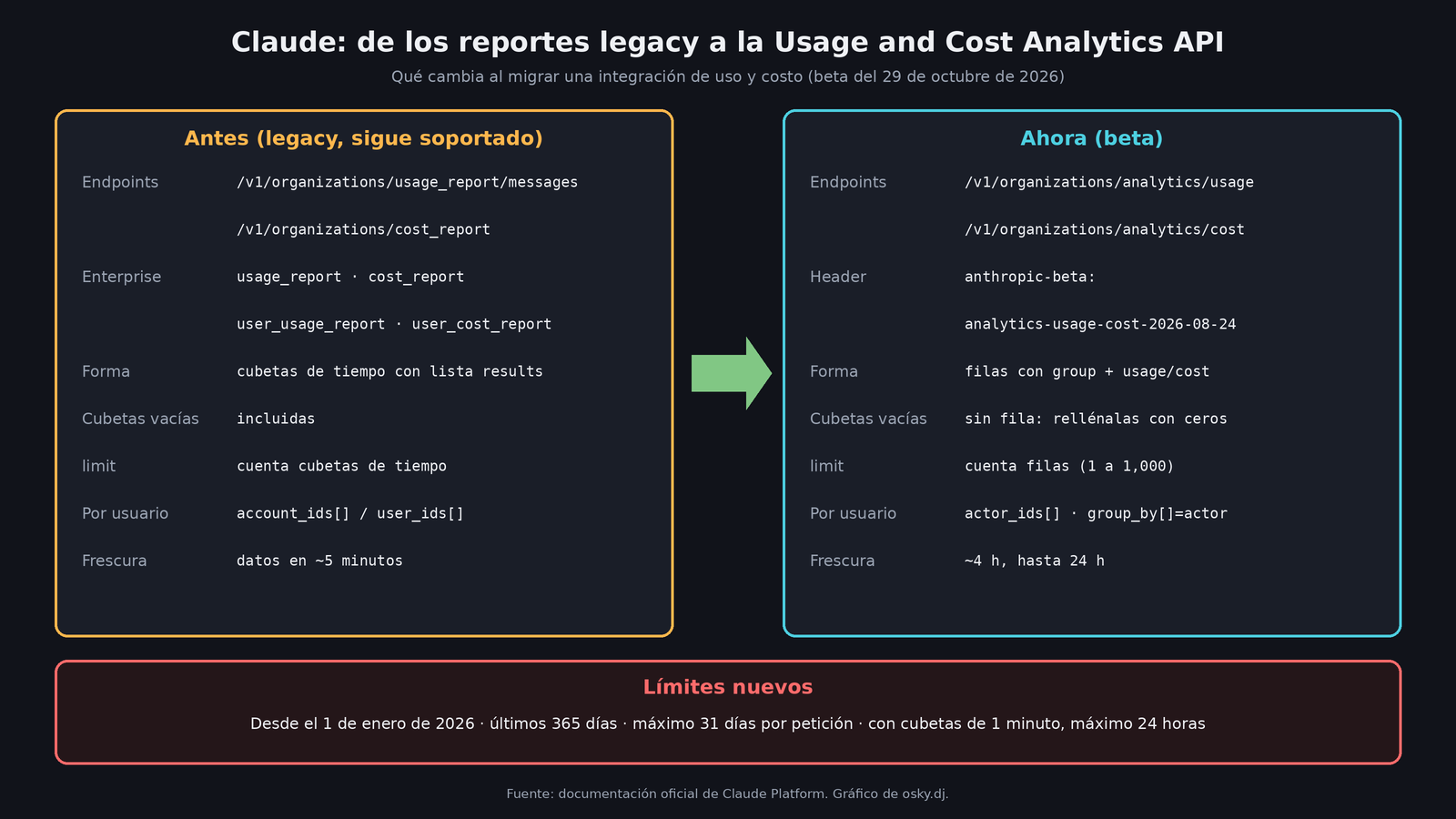
What you lose or what changes when you migrate
Here's the fine print, taken from the official migration table:
| Topic | Legacy | Analytics API (beta) |
|---|---|---|
| Freshness | Data in about 5 minutes | Normally 4 hours, up to 24 |
| Empty buckets | Included | No row; you have to fill in zeros |
limit |
Counts buckets | Counts rows, from 1 to 1,000 (20 by default) |
| Range | Any | From January 1, 2026, last 365 days, maximum 31 days per request |
| Unknown ID | Error | Matches nothing, no error |
| Default workspace | workspace_id: null |
Its real wrkspc_… ID |
| By user | account_ids[], service_account_ids[] |
actor_ids[] and group_by[]=actor |
Three points deserve attention. The first is freshness: if you have an alert today that warns you when a script goes haywire, with the new API you'll find out hours later. The second: a misspelled model name in models[] no longer blows up, it just returns empty, so a dashboard can show zero without anyone noticing the error. The third: values can be revised up to about 7 days after the month closes, and Anthropic recommends only querying months that ended at least a week ago if you want final totals.
For Enterprise the migration brings clear gains: the old reports only returned the top 100 groups per bucket and the new API returns all combinations, plus it lets you group by actor together with other dimensions.
How to migrate without breaking anything
This comes from the official Claude Platform documentation; I didn't test it for this article.
- Add the beta header and change the path to
/analytics/usageor/analytics/cost. Your Admin API key works the same. - Rename
bucket_widthtotime_bucket_widthand pass it explicitly (1dto keep your daily rows): it no longer has a default value. - If your report needs consecutive days, use
order_by=time&order=asc, paginate withlimit=1000, group bystarting_at, and fill in zeros for the days with no usage. - Split into several requests any range longer than 31 days.
- Change user filters to
actor_ids[]and check the default workspace case, which now comes with an ID. - Convert amounts from cents to dollars before displaying them.
My take
It's a real improvement for anyone who needs to attribute spend: ranking, actors, and a single integration for Console and Enterprise save you some ugly code. But I wouldn't sell it as a drop-in replacement. Because of the hours-long freshness, the new API works for finance, month-end closes, and dashboards; for near-real-time spend alerts, the legacy endpoint remains the best option for as long as it exists. My recommendation would be to migrate your reports now, since there's no rush, and leave the alerts on legacy until Anthropic says something about its retirement. "Legacy" without a date is not a blackout, but it is a warning.